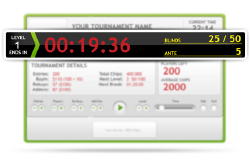
Once downloaded to your PC, Laptop, or smart-phone, the free software will allow you to choose the blind structure and the length of the levels. The software takes it from there with a full easy to use display of the pertinent information. Many modifications allow you to to increase or decrease the remaining time in any level; skip a level entirely; and pause the tournament at any point.
As Poker Clock is managed online, unlike other tournament clocks, other players in the tournament can synchronize their smart-phones or other devices to display the Poker Clock features, ideal for multiple table tournaments.
Areas of tournament information that can be customized as part of the display include (even after the tournament has begun):
- Name of Tournament
- Current Time
- Current Level/Time Left in Level/Blinds/Antes
- Number of Entries/Rebuys/Addons
- Total Chips in Play
- Total Prize-Pool
- Blinds at Next Level
- Time until Next Break
- Players Left/Average Chip Stack
- Pay-out Structure
- Number of Entries
- Number of Players (ie, adjusted as players go out)
- Rebuys & Add-Ons
- Pause the tournament
- Skip to next/previous level
- Adjust time left on level
If this free software would help your home tournament, check it out at PokerClock.com